Optimize Your iPhone’s Action Button Use
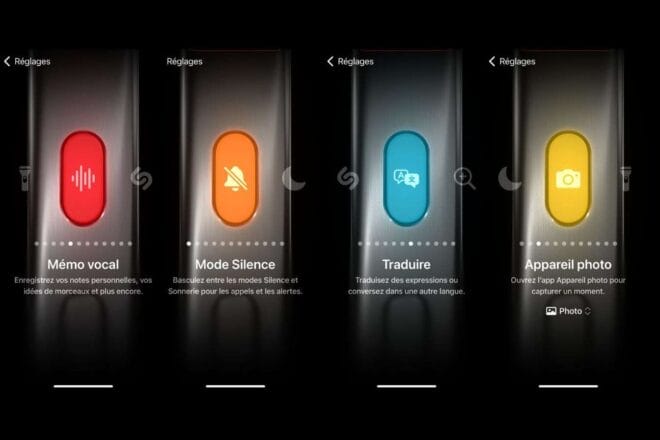
The Action button on the latest iPhones turns your smartphone into a highly customizable tool, allowing instant access to your favorite features and shortcuts with just a simple press.
The Action Button on iPhone: A Revolutionary Feature
The Action Button, a major innovation from Apple, is found on nearly every iPhone sold. This button serves as a gateway to a variety of features, apps, and shortcuts on your phone, all accessible with a simple press.
Whether it’s activating a smart home routine, accessing a custom shortcut without unlocking your phone, or using the flashlight, the Action Button is designed to simplify your daily interactions.
The Action Button: A Constant Evolution
Originally introduced as a replacement for the iPhone’s Ring/Silent switch on the iPhone 15 Pro, the Action Button quickly became essential. Apple noted that many users keep their phones on silent mode, making a reassignable button a “Pro” feature. Over time, similar to the “Dynamic Island,” it became available on all other Apple phones up to the iPhone 16.
One Button, Multiple Functions
By default, the Action Button acts as a mute button for your messages and ringtones, taking over the role of the old Ring/Silent switch. However, by navigating to the “Settings” app, you can reassign it to another function.
For instance, if you want to reassign the Action Button to activate the flashlight, you can follow these steps:
- Open the “Settings” app.
- Click on “Action Button”.
- Scroll through the options until you find the flashlight option.
- Test the functionality by pressing the Action Button.
This process can also be applied to reassign the Action Button to any other built-in action provided by Apple.
Open Your Favorite Apps With A Single Click
If you’re feeling adventurous, you can also set up the Action Button to open a specific app on your phone. For example, you might configure it to launch your favorite game, such as Balatro, with a press.
You can also set the Action Button to activate a specific shortcut, like starting a Pomodoro timer, by following a similar process as described above. With the Action Button, lock screen widgets, home screen widgets, and app shortcuts, accessing information, modifying a specific setting, or using a specific app function on your iPhone is now simpler and more intuitive.